

A/B testing tools for Shopify compared
A factual look at how A/B testing tools fit into Shopify, what Intelligems and AB Tasty say they test, how scripts affect speed, and how to choose.
- Published
- 22 Oct 2026
- As of
- 21 Oct 2026
A/B testing tools show different versions of a page, price or offer to different visitors, then compare the results. This guide is for merchants and developers weighing up options on Shopify. We cover what the tools do, who uses what in our sample, what two vendors' own docs say, and how to choose.
As of 2026-10-18. Features, integrations and prices are as each vendor’s own site showed them on that date; prices change, so check the vendor’s site before you buy. This is a factual comparison, not a ranking.
What these tools do and who uses what
An A/B testing tool shows different versions of something to different visitors, then compares what each group did. On Shopify that can mean a theme, a template, copy and images, prices, discounts, shipping rates, checkout or post-purchase offers. How much a tool can touch varies a lot. Intelligems' own docs, for example, group its experiences into six modules: Content, Merchandising, Pricing, Shipping, Checkout and Post-purchase. Checkout tests need Shopify Plus, while post-purchase offers run on every plan.
A/B testing: who uses what
Show the data
| Intelligems | 12% |
|---|---|
| Visually | 9% |
| Convert | 5% |
| AB Tasty | 4% |
| VWO | 3% |
| Optimizely | 2% |
| Google Optimize | 1% |
| Kameleoon | 1% |
Most tools work by adding a script to the storefront, so testing is also a performance decision. Intelligems' docs say you add its script to the theme, and AB Tasty's docs describe its tag as a five-minute setup. Script weight is why we come back to speed later. Shopify's performance guidance says JavaScript from the theme or installed apps runs on the main thread and is one of the primary causes of poor INP and delayed LCP.
Now the usage picture. Of the 321 stores we scanned, 34% have some A/B testing tool we can detect. Intelligems is the most common at 37 stores (12%), all on Shopify. Visually follows with 30 stores (9%), also all on Shopify, and Convert is next with 15 (5%), 14 of them on Shopify. The chart shows the full spread. Our tip is to read it as a map of who is testing what. Shopify-specific tools cluster at the top, and the general-purpose platforms sit further down.
Intelligems: profit-focused testing for Shopify
Intelligems is built around profit rather than just conversion. Its docs describe a profit optimisation platform for Shopify that tests and personalises content, prices, discounts, shipping rates, checkout and post-purchase upsells. It is also the most common tool in our scan: 37 indexed stores (12%) use it, and all 37 are on Shopify.
Experiences are grouped into six modules: Content, Merchandising, Pricing, Shipping, Checkout and Post-purchase. Every paid plan includes Content, and you add the others as you need them. Unlimited includes all of them. Every module except Pricing can be trialled for 14 days, so a sensible first step is to trial the module that matches your most pressing question rather than switching on everything.
You can limit any experience to an audience: by device, new or returning visitors, traffic source, country, UTM parameters, landing page, referring domain, cookies, or a Klaviyo segment. Results come back as conversion rate, AOV, revenue per visitor and gross profit per visitor. Add your COGS, shipping cost and transaction fee assumptions and profit shows on every experience. This tends to help because a price test that lifts conversion can still lose money, and only a profit view shows that.
Checkout experiences need Shopify Plus, while post-purchase experiences run on every Shopify plan. So a merchant on a lower plan can still test upsells after the order. As a developer, note that Intelligems needs its script added to the theme to run experiences. That is third-party JavaScript on the main thread, so check your theme's speed before and after installing it.
Intelligems plans and prices
Intelligems prices per store, based on monthly order volume. You pay a flat monthly fee for your volume tier, with no per-visitor charges or overages, so a traffic spike during a sale won't change the bill. Build Your Own plans start at $69/month at the lowest order volume tier, and annual billing is 20% off.
Build Your Own means you pick modules. Smart Content is included in every plan and covers landing pages, images and copy, themes and templates, split URL tests and on-site personalisation. Smart Pricing covers product prices, subscription prices, compare-at prices and multi-currency pricing. Smart Merchandising covers discounts, gifts with purchase, quantity breaks, progress bars, and cart and product page upsells. Smart Shipping covers shipping rates and free shipping thresholds and offers. Smart Checkout & Post-Purchase covers checkout blocks such as trust badges and upsells, plus one-click post-purchase offers. The checkout blocks need Shopify Plus, while Intelligems' own docs say post-purchase experiences run on every Shopify plan.
The Unlimited plan is listed as the Get Everything Bundle, and the Intelligems docs say it includes all modules. It requires a 3 month minimum, and the pricing page shows it with a struck-through list price and a discounted monthly figure, so check the current numbers there. Our tip: start with Content and the one module that matches your first hypothesis. If you test prices, note that every module except Pricing can be trialled for 14 days, so you can't try that one first. Add modules only when you have a test ready to run, because that is when the bundle starts to make sense.
AB Tasty: web and feature experimentation
AB Tasty sits at the broader end of the field. Its documentation has a section on Web Experimentation and Personalization, which is the part most merchants will meet first: changing what visitors see on the page and showing different versions to different people. It also lists a separate Feature Experimentation & Rollout area, which is aimed at testing and releasing changes in code rather than through a page editor.
For developers, the docs point to an API, an SDK and developer tools for custom integrations and tailored experiments. That matters if you build on Hydrogen or run logic outside the theme, because you can test in your own code instead of relying only on a visual layer. Check how the SDK fits your storefront before you commit.
Setup starts with a tag. AB Tasty's docs have a popular article titled Set up the AB Tasty Tag in 5 Minutes. A tag is a script added to your pages, and like any script it runs on the main thread, so measure your page speed before and after you add it. The docs also publish an A/B Test Calculator and a Minimum Detectable Effect Calculator, which help you judge how long a test needs to run. Use the second one before you start, to avoid testing a change too small to detect. In the stores we index, 12 use AB Tasty, 10 of them on Shopify. We didn't read its pricing, so check with the vendor.
What it means for speed
Every A/B testing tool adds something to the page, and that something is usually JavaScript. Shopify's performance guidance says scripts from your theme or installed apps run on the main thread, competing with the browser's ability to render content and respond to input. It calls this one of the primary causes of poor INP and delayed LCP. Those are two of the three Core Web Vitals, which Google uses as a ranking signal. So a testing script is never free, and you should check what it costs before you roll it out.
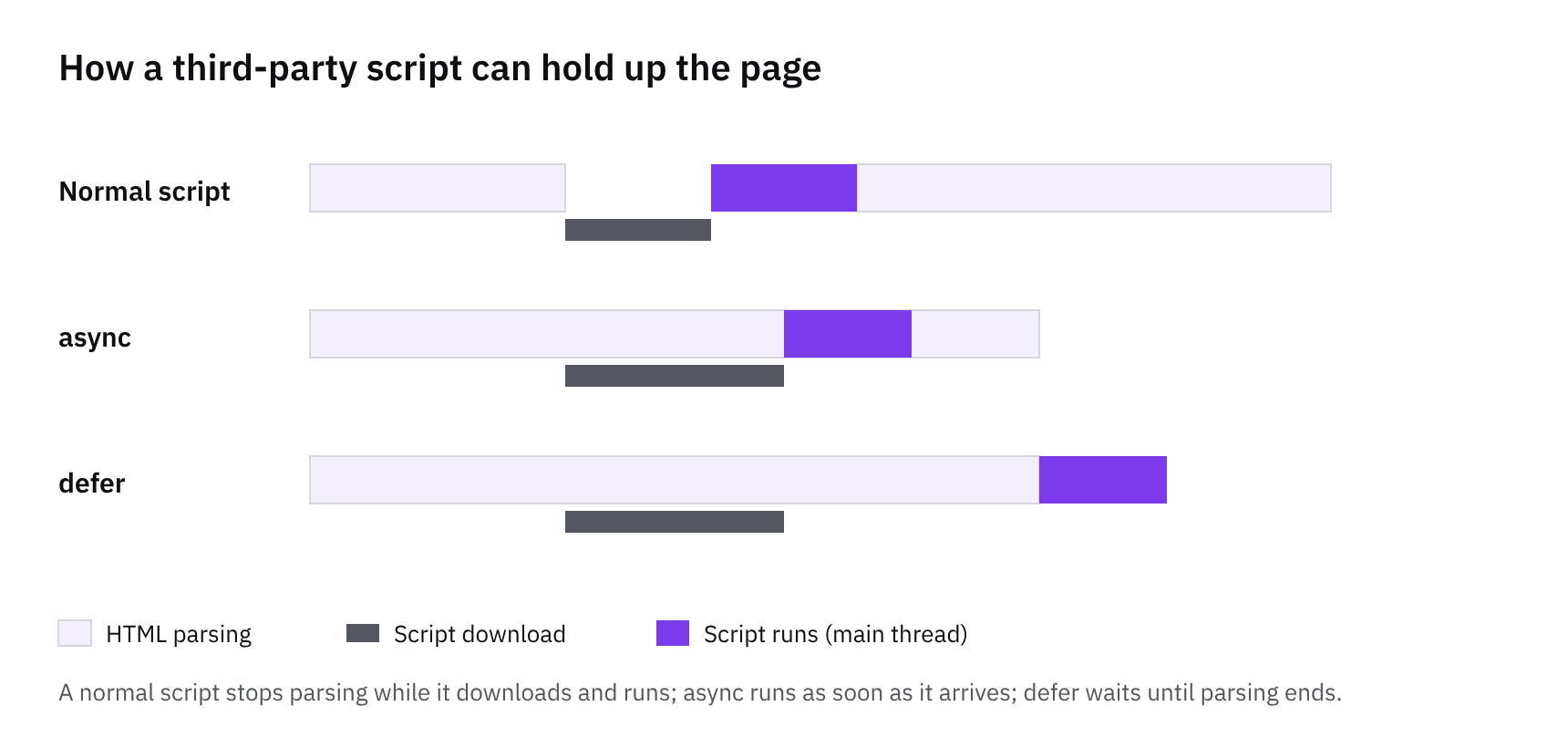
The tools differ in how they get onto the page. Intelligems requires its script to be added to the theme, and its docs have a Site Performance section worth reading before you install. AB Tasty has a tag, and its docs feature a setup article titled as a five-minute job. Quick to install is not the same as light to run, so measure it rather than assuming. Also remember that a tool which changes content in the browser is doing the very thing Shopify warns about: moving product info, hero content or navigation into client-side JavaScript delays LCP.
Here is what we'd check. First, compare Lighthouse and real-user LCP, INP and CLS on your key templates with the script on and off. Second, look at the hero image: it should load eagerly, never with lazy loading, and a test that swaps it late can undo that. Third, watch for layout shift when a variant appears, because a visible flicker usually means the change landed after first paint. Where you can, prefer tests that change what the server renders, such as split URL tests or Liquid-based variants, since Shopify renders Liquid server-side and that tends to avoid the late swap. Finally, run tests for a defined period and remove the script when you finish, so you don't carry the weight forever.
How to choose
Start with what you want to test, not the tool. If it's content, themes, templates or split URL tests, most tools can do it. If it's prices, discounts, shipping rates or checkout, the list narrows. Intelligems's docs cover prices, shipping and post-purchase offers, and checkout experiences need Shopify Plus. Post-purchase runs on every Shopify plan. So check your Shopify plan before you shortlist anything that touches checkout.
Next, look at how the tool is priced and how your team works. Intelligems is priced per store on monthly order volume, with no per-visitor charges or overages, and Build Your Own plans start at $69/month at the lowest order volume tier. Smart Content is in every plan, and you add modules from there. The Unlimited plan has a three-month minimum. Pricing is also worth a thought if your traffic is spiky, because order-based pricing behaves differently from visitor-based pricing. For AB Tasty, we haven't got a published price to quote, so treat pricing as on request and ask early.
Then think about your developers. AB Tasty documents an API, an SDK and developer tools, plus a separate feature experimentation and rollout area. That suits teams who want to test beyond the storefront, or run tests in custom code. A merchant-led team will probably prefer a tool whose results are framed around profit. Intelligems reports conversion rate, AOV, revenue per visitor and gross profit per visitor, and it can work out profit if you add your cost assumptions.
Finally, weigh the speed cost. Every tool here needs a script on your pages, and Shopify's performance guidance says app JavaScript runs on the main thread and is a primary cause of poor INP and delayed LCP. Ask how the script loads, test your key templates before and after, and keep hero content in Liquid rather than client-side code. Shopify's guidance says moving it into JavaScript delays LCP. A tool that fits your tests and plan but slows your product page is still the wrong fit.
How we measured this
Of 321 stores we index that we could scan, not the whole market.
Features and tools are read from each store’s public HTML, so anything added only by JavaScript after the page loads may be missed: treat these as lower bounds.
Tools are recognised by our detection rules; a tool we have no rule for isn’t counted.
Spotted something out of date? Tell us and we’ll correct it.
Get the weekly digest
One email every Monday: the week’s new guides and articles, plus the Shopify deadlines coming up and what’s been announced. Free, and you can unsubscribe in one click.
Sources
- Welcome to Intelligems | Intelligems Docs · docs.intelligems.io · accessed 18 Oct 2026
- Welcome to AB Tasty documentation | AB Tasty Documentation · docs.abtasty.com · accessed 18 Oct 2026
- Pricing & Plans | Intelligems · intelligems.io · accessed 18 Oct 2026
- Performance best practices for Shopify themes · shopify.dev · accessed 18 Oct 2026
- How CommerceGeek measures · CommerceGeek · accessed 18 Oct 2026
AI-assisted, reviewed by Scott. Every claim is checked against the sources above.