

Handling Cart, Checkout and Redirect State in Shopify: Sessions, Cart Updates and Prefilled Addresses
A practical plan for handling cart and checkout state on Shopify: Ajax Cart API updates, Storefront API carts, prefilled buyer details and Hydrogen's server-side cart.
- Published
- 13 Nov 2026
- As of
- 2 Nov 2026
Custom cart drawers, cross-store redirects and offsite payment steps all depend on one thing: knowing where cart state lives and who owns it. This guide is for developers building those flows, and for the merchants who need them to behave predictably.
Where cart state lives and why it matters
Cart state belongs to a buyer session. Whatever the shopper has added, the discounts applied and the notes attached all live in that one cart, and every part of your storefront should read from it. If the drawer shows something different from the cart, the shopper notices straight away, and a stale drawer is exactly where trust drops: a price that shifts at checkout, or a quantity that doesn't match what they just chose.
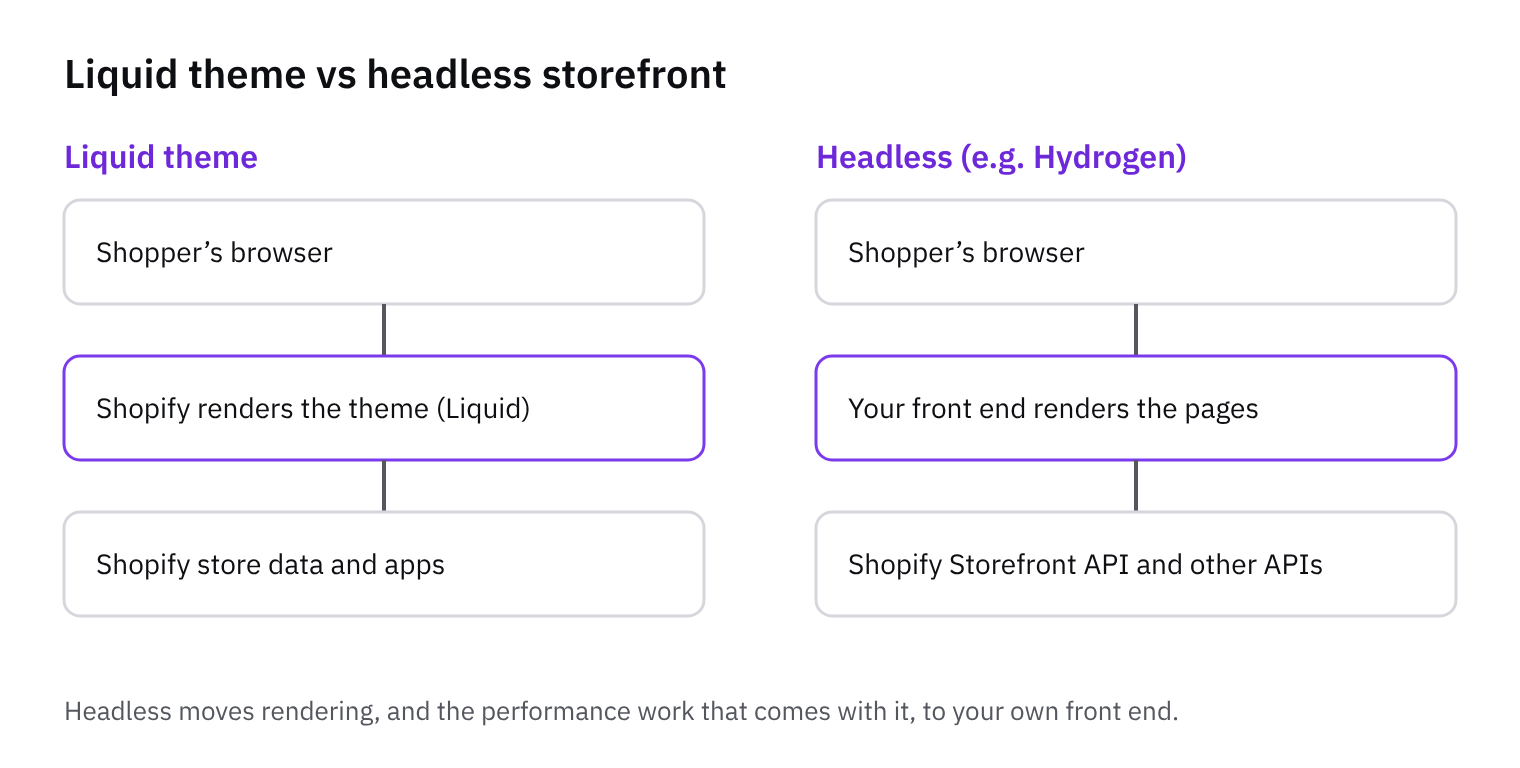
In a Liquid theme, the Ajax Cart API is your tool. Per the Cart API reference, you add one or several variants with the cart/add.js endpoint, and requests should use locale-aware URLs so visitors get a consistent experience. Two behaviours are worth building for. If the item is already in the cart, the response quantity is the new total for that item, not the amount you just added. And if the shopper asks for more than the available stock, the cart adds the maximum available and returns an error message. Read the response, don't assume your request succeeded as sent. The same docs note that price changes are typically the result of automatic discounts, so re-render prices from the response rather than from your own arithmetic.
In a headless build, the Storefront API owns the cart instead. The cartCreate mutation creates a new cart for a buyer session, and you can initialise it with lines, discount codes, gift card codes, buyer identity and custom attributes. The returned cart includes a checkout URL that takes the buyer on to complete their purchase. It also returns user errors and warnings, so surface those in the drawer rather than swallowing them.
Our tip: decide early which API owns the cart, and never mix the two on one storefront. Each one has its own idea of the current cart, so mixing them tends to produce a drawer that disagrees with checkout. Pick one, route every add, update and removal through it, and let the drawer render only from its latest response.
Refreshing the cart drawer after updates
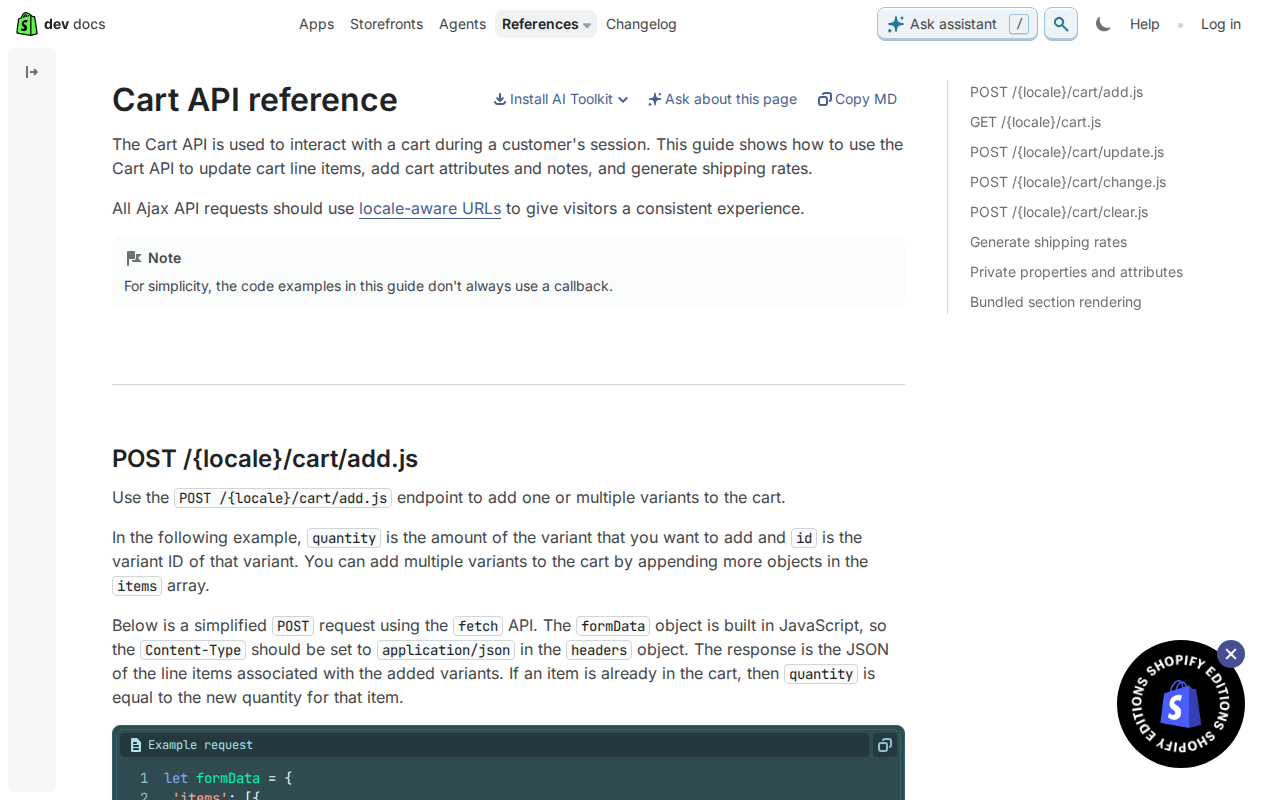
Start with the request. The Cart API reference says all Ajax API requests should use locale-aware URLs, so post to /{locale}/cart/add.js rather than a bare /cart/add.js. That keeps a visitor on a Spanish or French storefront in the same context after they add something. In Liquid, you can pass the locale-aware root URL into your script from a data attribute instead of hard-coding it. The same endpoint adds one or several variants, so a bundle or a quick-add row can go in a single call.
If you send a JSON body, set Content-Type to application/json in the headers. The reference notes that the body is built in JavaScript, so the header has to say so. Leave it off and the request may not be read the way you meant. Then read the response rather than ignoring it. When an item is already in the cart, the quantity in the response equals the new quantity for that item, not the amount you just added. So if a shopper had two and added one, expect three back. Don't add the numbers together yourself.
The same goes for money. The reference says price changes are typically the result of automatic discounts, which means a line can cost something different from what your local sum suggests. Re-render totals from the returned data, not from your own maths. This tends to help because the drawer then can't drift from what the cart actually holds. Here is the tip: rebuild the drawer from the response, and when stock caps the quantity, show the error message. The reference says that if a request exceeds available stock, the cart adds the maximum available and returns an error message. Without that message, a shopper sees fewer items than they asked for and no explanation.
Creating carts and prefilling buyer details
Start a buyer session with cartCreate in the Storefront API. It creates a new cart, and you can seed it in the same call: merchandise lines, discount codes, gift card codes, custom attributes and a note. The returned cart includes a checkout URL, which is where you send the buyer to complete their purchase. So a custom flow, or a redirect from another store, can build the cart up front and hand over a single link.
Buyer details go in the buyer identity input. It accepts email, phone, country code, a customer access token, a B2B company location and preferences. The cartCreate input also takes a delivery field, which holds a list of selectable addresses, so you can pass address details at creation rather than asking again. Each line needs a merchandise ID, and quantity, attributes and selling plan are optional. Attributes need both a key and a value, each a string, so don't send empty values.
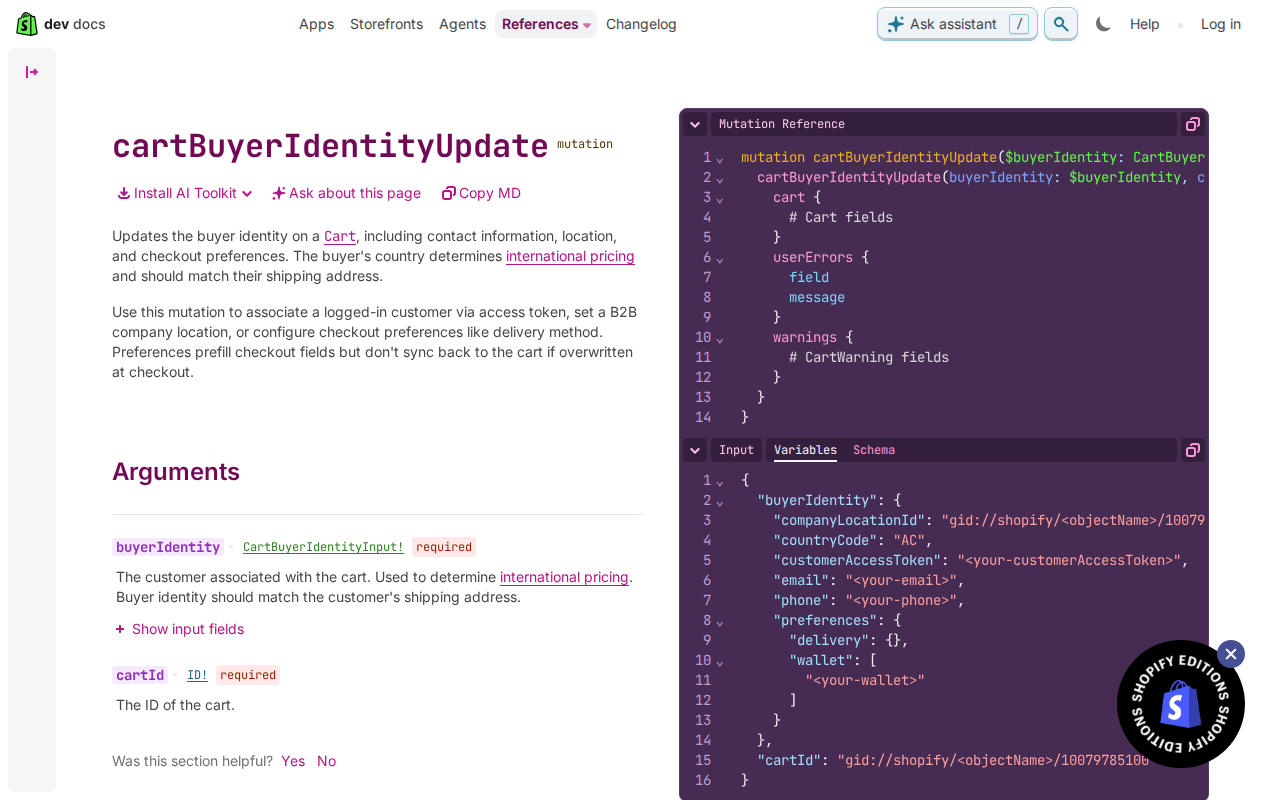
Need to change identity later, say after the buyer logs in or picks a market? Use cartBuyerIdentityUpdate with the cart ID and the new identity. The Storefront API docs say the buyer's country determines international pricing and should match the shipping address. That is our main tip here: set the country from the address you collect, so the prices the buyer sees in the cart agree with what checkout calculates. One caution from the same docs: preferences prefill checkout fields, but they don't sync back to the cart if the buyer overwrites them at checkout. Treat them as a head start, not a source of truth.
Finally, check userErrors and warnings on every call. Both cartCreate and cartBuyerIdentityUpdate return them alongside the cart. A response can come back with a cart and still carry a problem, so a quick look at those two lists before you render or redirect saves you from sending a buyer to a cart that isn't what you intended.
Redirects, offsite payments and Hydrogen
When you send a buyer to another store or an offsite payment step, pass the checkout URL from the cart. The Storefront API returns a checkout URL with the cart when you create it, and it directs the buyer to complete their purchase. Treat that URL as the handoff point rather than rebuilding the journey yourself. Store the cart ID before the redirect, so you can find the cart again if the buyer comes back.
Prefilling helps, but it only goes one way. The cartBuyerIdentityUpdate mutation can set email, phone, country and delivery or wallet preferences. The docs say preferences prefill checkout fields but don't sync back to the cart if overwritten at checkout. So if a buyer changes their details at checkout, your cart won't know. Treat checkout as the source of truth, and read confirmed details from the order, not from your own cart state. Keep the country in line with the shipping address too, because the docs say country determines international pricing.
If you build on Hydrogen, the server-side cart helps with this. The Hydrogen cart overview says it reduces the JavaScript sent to the browser, and that managing state on the server lets cart instances be shared across app contexts. The cart handler is extensible, so you can add custom features or override built-in behaviour. That's a sensible place to attach redirect logic. One caution: these are legacy Hydrogen docs, covering versions 2026-04 and earlier. For later versions, check the latest Hydrogen docs before copying anything.
Pitfalls and what to do next
Three pitfalls catch most custom cart flows. First, timing. The Cart API reference warns that changes you make to products and variants with the GraphQL Admin API "can take a few seconds to become available to the Cart API." If your sync job updates a variant and a test add-to-cart fails straight after, don't assume the code is broken. Retry with an increasing delay, so the first retry is quick and later ones wait longer. That gives the change time to arrive without hammering the endpoint.
Second, stock limits. The Cart API reference says that if the requested quantity exceeds available stock, the cart adds the maximum available and returns an error message. So a response can be partly successful. Don't just refresh the drawer and move on. Read the returned quantity and the error, then tell the shopper what actually landed in the cart. Third, locale. The same reference says all Ajax API requests should use locale-aware URLs, so build your cart paths from the active locale rather than hard-coding them. This tends to help because the shopper stays in one language and market across the drawer, cart page and checkout.
Next steps are short. Audit every place your store reads cart state, and make sure each one refreshes from the same response after an update. Add handling for userErrors, which the Storefront API cart mutations such as cartBuyerIdentityUpdate return alongside the cart and warnings. Remember that preferences prefill checkout fields but don't sync back to the cart if the buyer overwrites them there. Then test a full redirect round trip: leave for the other store or payment page, come back, and check the cart, country and prefilled details still match.
Get the weekly digest
One email every Monday: the week’s new guides and articles, plus the Shopify deadlines coming up and what’s been announced. Free, and you can unsubscribe in one click.
Sources
- Cart API reference · shopify.dev · accessed 2 Nov 2026
- cartCreate - Storefront API · shopify.dev · accessed 2 Nov 2026
- cartBuyerIdentityUpdate - Storefront API · shopify.dev · accessed 2 Nov 2026
- Cart overview · shopify.dev · accessed 2 Nov 2026
AI-assisted, reviewed by Scott. Every claim is checked against the sources above.