

How Shopify stores power their collection pages: native filtering vs search and merchandising apps
Shopify's built-in filtering covers many collection pages. Here is what it does, when stores add a search and merchandising app, and what to compare before you choose.
- Published
- 23 Oct 2026
- As of
- 21 Oct 2026
This is for merchants choosing how collection pages should filter and sort, and for developers who build them. We look at what native filtering does, who uses what in the stores we scanned, and the questions that matter when you compare apps.
As of 2026-10-18. Features, integrations and prices are as each vendor’s own site showed them on that date; prices change, so check the vendor’s site before you buy. This is a factual comparison, not a ranking.
What native filtering does, and what apps add
Shopify's Search & Discovery app is the native route to filtering. You choose which filters appear on collection and search pages, such as availability, price, product type, vendor or options like size and colour, and the theme renders them. It also lets you set up search tweaks like synonyms. For many catalogues that is enough, and it adds little extra weight to the page.
Stores tend to look elsewhere when the catalogue or the merchandising team outgrows it. This is reasoning from how the category works, not a measured result. Common pressures are finer control over filter order and labels, rules that pin or bury products on a collection, richer sorting, and search that copes with typos and long, messy queries. Bigger catalogues and several markets make those gaps more noticeable, because hand-sorting stops scaling.
Apps add those controls, usually through a hosted index and a rules interface for merchandisers. The trade-off is another script, another bill and another system to keep in sync with your products. Our scan of 321 stores shows that only a small share use any dedicated search tool we detect, so native filtering is still the norm. Our tip: write down the three merchandising jobs you can't do today before you trial an app. If native filters cover them, stay put. If not, check how the app loads on collection pages before you commit.
Who uses what in our sample
Start with the headline: very few of the stores we scanned run a site search tool we can detect. Across 321 stores, only 6% show any at all. The chart below breaks that down by vendor.
Site search: who uses what
Show the data
| Constructor | 2% |
|---|---|
| Algolia | 1% |
| Klevu | 1% |
| Searchspring | 1% |
| Bloomreach | 0% |
| Doofinder | 0% |
Constructor appears most often, with 6 stores, and 4 of those are on Shopify. After that the numbers are small. Klevu shows up on 4 stores, all on Shopify. Searchspring has 3, also all on Shopify, and Algolia has 3, with 2 on Shopify. Bloomreach and Doofinder each appear once. Boost Commerce, Searchanise, Coveo and Findify don't appear in our sample at all.
Read that as a prompt to check your own store, not as a verdict on any tool. A low count tells you these apps are rarely detectable here, not how well they work. Detection also depends on what a tool loads on the public page, so a store using native filtering may look the same as one using a lightweight app. If you're auditing a collection page, open the network tab and see which scripts handle filtering. That shows you what is actually running before you compare options.
What these apps tend to offer
Search and merchandising apps tend to cover four jobs on a collection page. They build faceted filtering, which lets shoppers narrow a list by things like size, colour or brand. They offer sort options beyond the defaults. They let your team set rules to pin products to the top or bury them lower down. And they manage synonyms, so a search for one word still finds products described with another. This is general reasoning about the category, not a feature-by-feature reading of any one tool.
Algolia, Klevu, Searchspring and Constructor are the four we see most often in the stores we scanned, and Klevu, Searchspring and Constructor appear mostly on Shopify. Constructor is the most common of the four here, with six stores, but all of these counts are small. Treat them as a hint about what exists, not a verdict on what suits you. A practical tip: before you shortlist anything, write down which of the four jobs you actually need. A store with a small catalogue may only want better filters, while a large one may care most about pinning and burying rules.
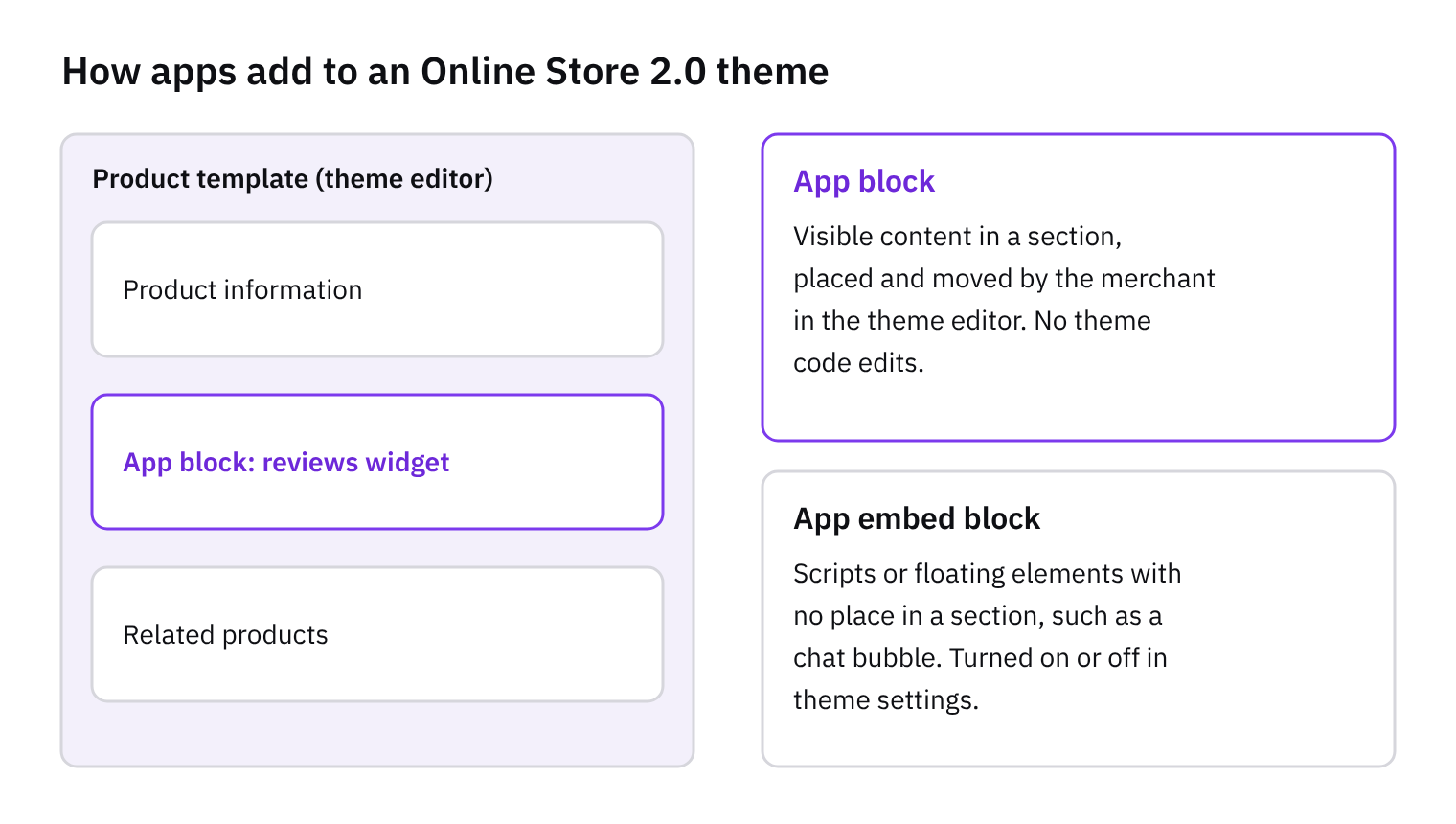
We did not read vendor docs for this comparison, so we do not compare individual plans or prices. Confirm pricing with each vendor directly. When you test an app, check how it adds its filters to your theme. Apps that load through a theme app extension tend to be easier to switch on and off, and it is worth watching how much extra script they add to the page, because that can slow collection pages down.
Performance and loading on collection pages
Collection pages are often the heaviest pages in a store, because they combine many product images with filters, sorting and pagination. A search and merchandising app adds to that load. Many of them ship their own JavaScript, fetch results from their own servers and draw the product grid in the browser, rather than using the HTML your theme already renders. This tends to affect speed because the shopper waits for the script to download, run and fetch results before the grid is complete. It can also shift the layout while it settles.
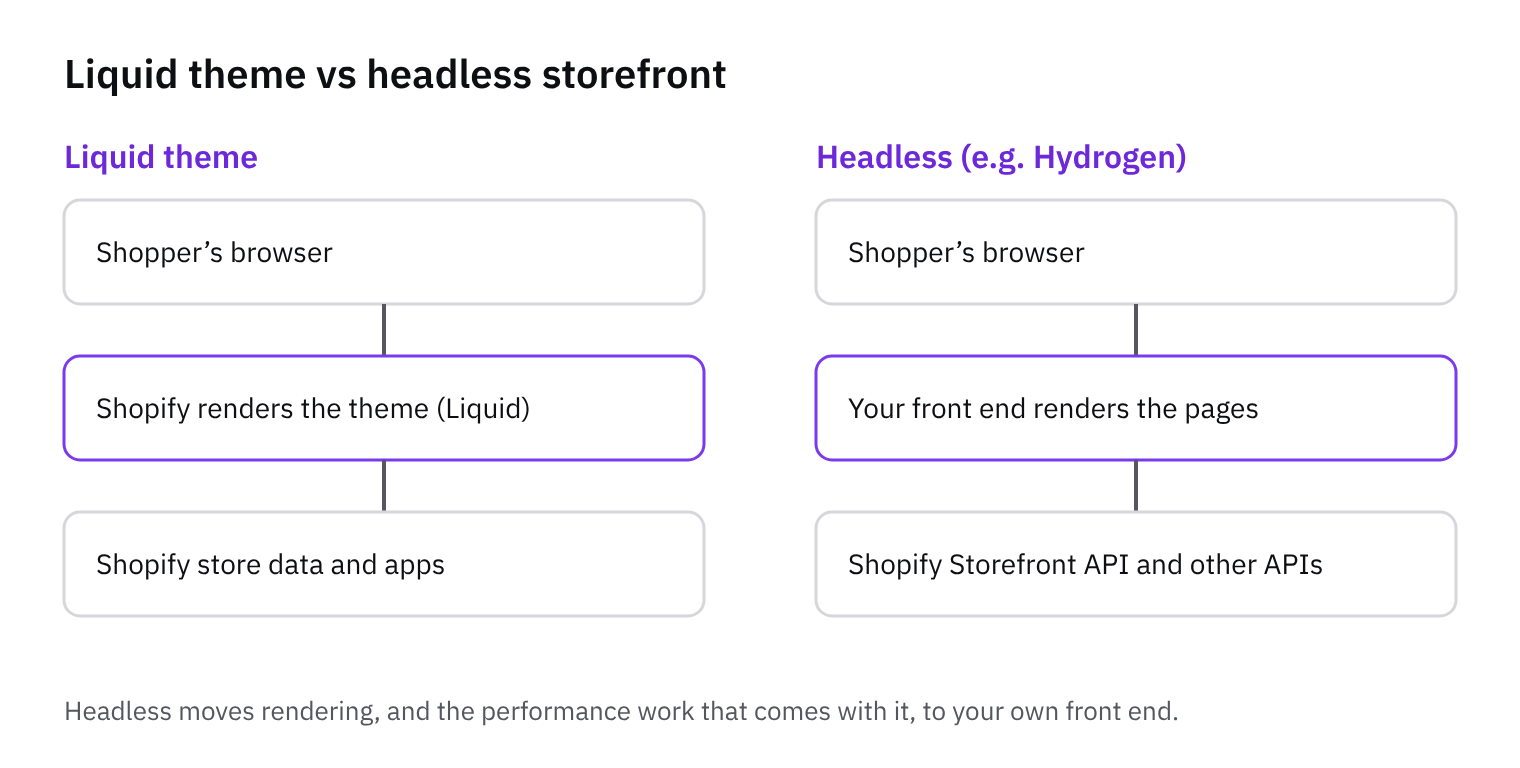
Native filtering in Search & Discovery works within your theme's Liquid rendering, so there is no extra script bundle for the grid. That is a reasoned point, not a measured result. Apps can earn their weight with richer merchandising and faster search on large catalogues, so the question is whether the trade is worth it for your store. Only a small share of the stores we scanned use any site search tool we detect, at 6%. For most of them, the native route is the baseline an app has to beat.
Our tip is to test collection pages with and without the app, on the same template, device and connection. Compare how quickly the grid appears and whether the layout jumps. Then check how the app loads its JavaScript. Look for scripts that load asynchronously or deferred, rather than blocking the page, and prefer app embeds or theme app extensions to code pasted into the theme, as they are easier to switch off cleanly when you test. Our diagrams on script loading and theme app extensions cover both. If you're weighing a headless build, the headless versus theme diagram shows the trade-offs.
How to choose
Start with how much merchandising control the team actually needs. If you mostly want filters and a sensible sort order, Shopify's own Search & Discovery may be enough, and it adds no extra script or sync to look after. If merchandisers want to pin products, boost by margin or stock, or run rules per collection, that's the point where an app starts to earn its place. Write down the three rules your team would use every week and check each app can do them without a developer.
Next, look at how it plugs into the storefront. On a Liquid theme, ask whether the app ships as a theme app extension, with app blocks and embeds you can switch on and off, or whether it needs code pasted into templates. The first is easier to remove and to upgrade. On Hydrogen, you'll usually call the vendor's API or SDK and render the results yourself, so check that the docs cover that route. Either way, test the page weight, because extra third-party scripts tend to slow collection pages down. Our script-loading and headless-vs-theme diagrams explain the trade-offs.
Then cover data and ownership. Ask how products, variants, prices, inventory and metafields reach the app, how quickly changes appear, and what happens if a sync fails. Decide who maintains the rules: merchandisers in the app's dashboard, or developers in code. Unowned rules go stale quickly. Finally, trial on one collection first. Pick a busy one, run the app beside the native setup, and compare the results before rolling out. Of the 321 stores we scanned, only a small share use any site search tool we detect, so native filtering is still the norm. That means moving to an app should be a decision you've tested, not a default.
How we measured this
Of 321 stores we index that we could scan, not the whole market.
Features and tools are read from each store’s public HTML, so anything added only by JavaScript after the page loads may be missed: treat these as lower bounds.
Tools are recognised by our detection rules; a tool we have no rule for isn’t counted.
Spotted something out of date? Tell us and we’ll correct it.
Tools in this article
Which of the stores we index use them, by platform, sector and over time.
- Klevu on 5 stores
- Searchspring on 7 stores
- Algolia on 4 stores
- Constructor on 8 stores
- Bloomreach on 2 stores
- Doofinder on 1 store
- Searchanise on 1 store
Get the weekly digest
One email every Monday: the week’s new guides and articles, plus the Shopify deadlines coming up and what’s been announced. Free, and you can unsubscribe in one click.
Sources
- How CommerceGeek measures · CommerceGeek · accessed 18 Oct 2026
AI-assisted, reviewed by Scott. Every claim is checked against the sources above.