

Migrating to Expiring Offline Access Tokens: A Step-by-Step Guide for App Developers
Public apps must use expiring offline access tokens for GraphQL Admin API requests by January 1, 2027. Here is how to migrate without breaking installs.
- Published
- 12 Nov 2026
- As of
- 2 Nov 2026
This guide is for app developers who maintain public Shopify apps with stored offline tokens. We cover how expiring tokens behave, how to exchange and refresh them, how to find installs still on non-expiring tokens, and how to keep slow refresh calls from tying up your database.
Why this migration matters
Shopify's access tokens documentation says public apps must use expiring offline access tokens for GraphQL Admin API requests by January 1, 2027. That deadline doesn't apply to custom apps or apps created by merchants. If you build a public app, it applies to you. If you build a one-off app for a single merchant, it doesn't.
What do non-expiring tokens lose? Per the same docs, they grant permanent access until the app is uninstalled or the secret is revoked. New public apps already can't use them for GraphQL Admin API requests, and existing public apps can't after the deadline. So a store still on an old token will see its Admin API calls stop working. Expiring tokens change the model: your app gets a short-lived access token plus a refresh token, and renews without anyone clicking anything.
Our tip: put the deadline in your roadmap now, and treat Shopify's changelog post titled Migrate to expiring offline access tokens before January 1, 2027 as the trigger to start. It's listed under the Platform category with the label Action required. The migration touches token storage, refresh logic and install lookups, so it tends to take longer than a quick patch. Starting early also leaves room to test refresh failures on a few installs before every store depends on it.
How expiring offline tokens work
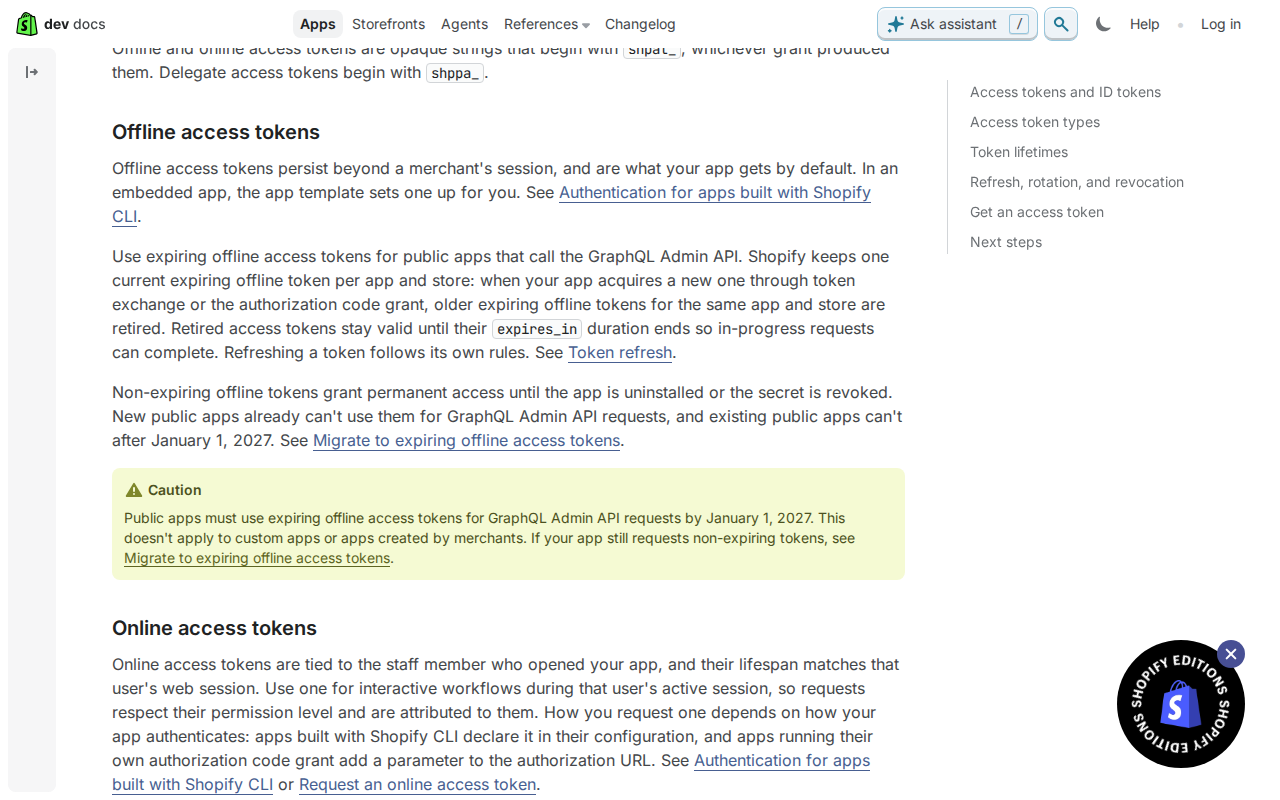
An expiring offline access token lasts one hour, and the token response says so with an expires_in of 3600. It arrives with a refresh_token, which your app uses to get a new access token before the current one runs out, with no user interaction. That is the whole idea: short-lived access tokens, renewed quietly in the background. Shopify's access tokens documentation covers this in its offline access tokens section.
The refresh token lasts 90 days when issued (refresh_token_expires_in is 7776000), but the docs add that using it to refresh can shorten it. So don't treat 90 days as a fixed deadline. Read expires_in and the refresh expiry from each token response and store them, rather than hard-coding a duration. The docs give the reason: your app keeps working if a lifetime changes.
Shopify keeps one current expiring offline token per app and store. When your app acquires a new one, through token exchange or the authorization code grant, older expiring offline tokens for that app and store are retired. Retired access tokens stay valid until their own expires_in ends, so requests already in flight can finish. This tends to help during a migration because a slow or retried call won't fail the moment a newer token exists.
Refresh tokens have an overlap rule too. After a refresh, the previous refresh token remains usable until your app uses the new one, or until 30 days after its first use or its original expiry, whichever comes first. In practice, that gives you room if a response is lost before you save it. Still, write the new refresh token to storage as soon as the response arrives, and make that write the first thing you do with it.
Exchanging and refreshing tokens
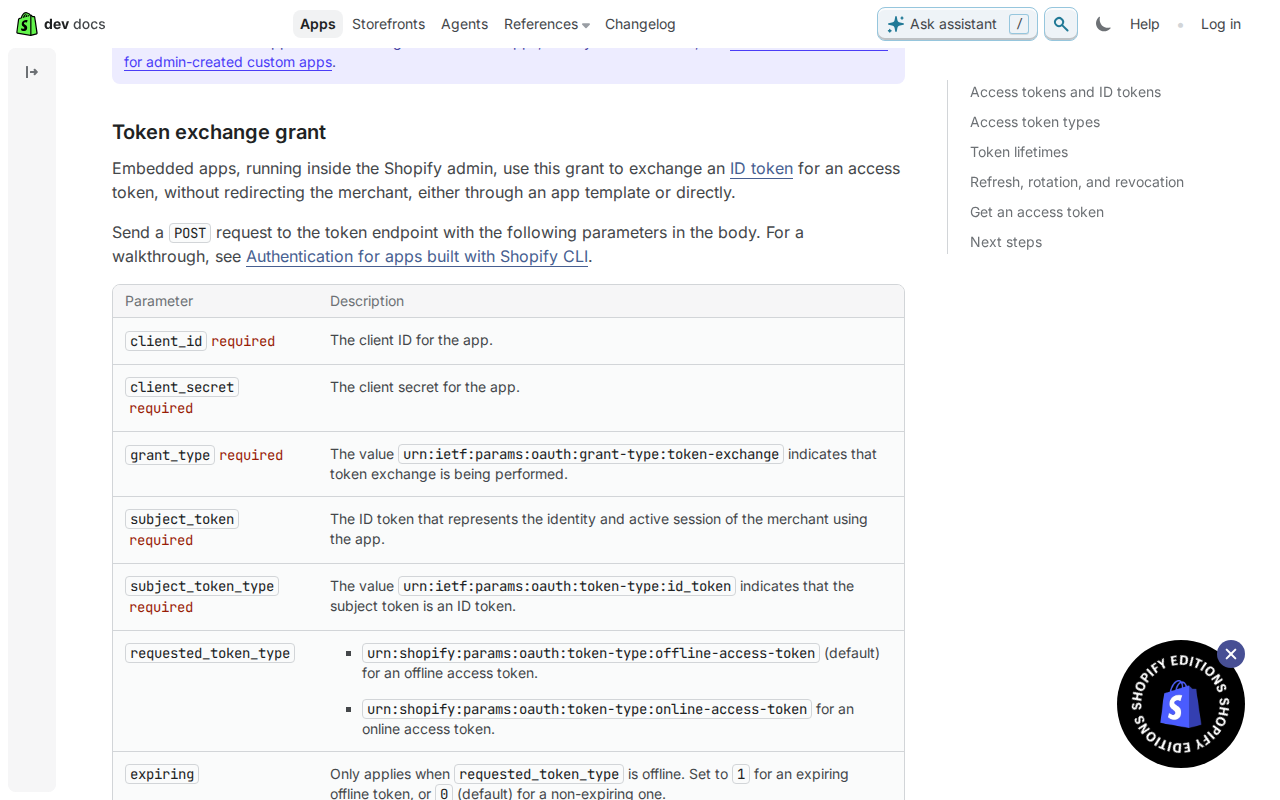
Start with where the ID token fits. In Shopify's ID token docs, it is a short-lived JWT that App Bridge issues to your embedded app to prove a request comes from an authenticated Shopify user. It carries no permissions, so you can't use it to call a Shopify API. It expires one minute after it's issued, so fetch a fresh one for each request rather than caching it. App Bridge may also hand back a cached token with less than the full minute left, so don't assume a fresh one has its whole lifetime. Your app swaps the ID token for an access token, and that access token is what you send on every GraphQL Admin API request. Standalone apps that run outside the Shopify admin can't use App Bridge, so they get access tokens through the authorization code grant instead.
Validate ID tokens properly before you exchange them. If you check them by hand, verify the signature against your client secret using HS256 (HMAC-SHA256). Then check the claims: exp must be in the future, nbf must be in the past, and aud must match your app's client ID. Here's the tip: if any check fails, reject the request with a 401 before calling the token endpoint. That keeps bad requests away from Shopify and from your token storage. Treat the ID token as a bearer credential too. Send it to your own backend only, never to a third-party service. In an embedded app, App Bridge's fetch interceptor adds it to requests to your app's domain automatically, so you rarely need to attach it yourself.
Then comes the refresh. The Shopify access tokens docs say an expiring offline token comes with a refresh_token, which your app uses to get a new access token before the current one expires, without user interaction. The access token lasts one hour, and the refresh token lasts 90 days when issued, though using it to refresh can shorten that. Read expires_in from the token response rather than hard-coding a duration, so your app keeps working if a lifetime changes. Store the new refresh token every time you refresh. The previous one stays usable until you use the new one, or until 30 days after its first use or its original expiry, whichever comes first. Shopify also keeps one current expiring offline token per app and store, and retired access tokens stay valid until their own expires_in runs out, so in-flight requests can finish. This tends to help in practice: refresh a little ahead of expiry, and write the new token pair in one short, atomic update so a slow refresh call never holds a long database lock.
Finding installs still on non-expiring tokens
The docs don't prescribe a way to find installs still on non-expiring tokens, so this is our reasoning rather than an official method. The idea is simple: store the token type and an expiry time next to each shop's token. A non-expiring offline token has no expiry, so any row with an empty expiry is a shop you still need to move. Expiring tokens give you something to record, because Shopify's access token docs say the response carries an expires_in value. Read it from the response instead of hard-coding a duration, and save the resulting expiry time with the token.
Once you can query for rows with no expiry, migrate them in batches. Start with active installs, meaning shops that still make Admin API calls, because they are the ones that break when enforcement arrives. Public apps must use expiring offline tokens for GraphQL Admin API requests by January 1, 2027, and the docs say existing public apps can't use non-expiring ones after that date. Dormant shops can wait for the end of the queue. Small batches also keep your database calm: you write a handful of rows at a time instead of holding a long lock while Shopify responds.
One thing helps during the swap. Shopify keeps one current expiring offline token per app and store, and acquiring a new one retires older expiring tokens. Retired access tokens stay valid until their expires_in ends, so in-progress requests can finish. Our tip: track progress as a single count of installs with no expiry. Chart it daily, and when it reaches zero you're done.
Handling slow refresh calls without locking your database
Don't hold a database transaction or row lock open while you wait on Shopify. A slow network call inside a lock ties up a connection, and every other request for that shop queues behind it. The pattern we'd use is: read the current token and its expiry, release the lock, call Shopify's token endpoint, then write the result in a short, separate step. This tends to help because the only thing you hold a lock for is local work that finishes fast.
Next, stop concurrent requests refreshing twice. A per-shop lease works well: the first worker to claim it does the refresh, and others either wait briefly or use the token they already have. A queue keyed by shop does the same job. Give the lease a short expiry so a crashed worker can't block that shop forever. Remember the access token only lasts 1 hour, and Shopify's docs say to read expires_in from the response rather than hard-coding a duration, so store the expiry you are given and refresh ahead of it.
The rules in Shopify's access token docs give you room to recover. Shopify keeps one current expiring offline token per app and store, and when you acquire a new one, older ones are retired. Retired access tokens stay valid until their expires_in ends, so in-progress requests can complete. On a refresh, the previous refresh token stays usable until your app uses the new one, or until 30 days after its first use or its original expiry, whichever comes first. So if a worker dies after Shopify responds but before you save, you can usually retry with the old refresh token rather than forcing a reinstall. Save the new refresh token before you discard the old one.
Rotating your client secret is a different case. The docs say it invalidates access tokens tied to the old secret and requires every store's token to be refreshed, and that it is a deliberate operation, not part of normal renewal. Plan it like a batch job: spread the refreshes through the same per-shop queue rather than firing them all at once, and track which shops are done.
Get the weekly digest
One email every Monday: the week’s new guides and articles, plus the Shopify deadlines coming up and what’s been announced. Free, and you can unsubscribe in one click.
Sources
- https://shopify.dev/docs/apps/build/authentication-authorization/access-tokens#offline-access-tokens · shopify.dev · accessed 2 Nov 2026
- https://shopify.dev/docs/apps/build/authentication-authorization/access-tokens#token-exchange-grant · shopify.dev · accessed 2 Nov 2026
- https://shopify.dev/docs/apps/build/authentication-authorization/access-tokens · shopify.dev · accessed 2 Nov 2026
- https://shopify.dev/docs/apps/build/authentication-authorization/id-tokens · shopify.dev · accessed 2 Nov 2026
- https://shopify.dev/changelog · shopify.dev · accessed 2 Nov 2026
AI-assisted, reviewed by Scott. Every claim is checked against the sources above.