

Mobile share and speed by sector
Phones carry most Chrome visits in every sector we looked at, yet passing Core Web Vitals varies widely, from big retailers at the bottom to food and drink at the top.

- Published
- 15 Oct 2026
- As of
- 17 Oct 2026
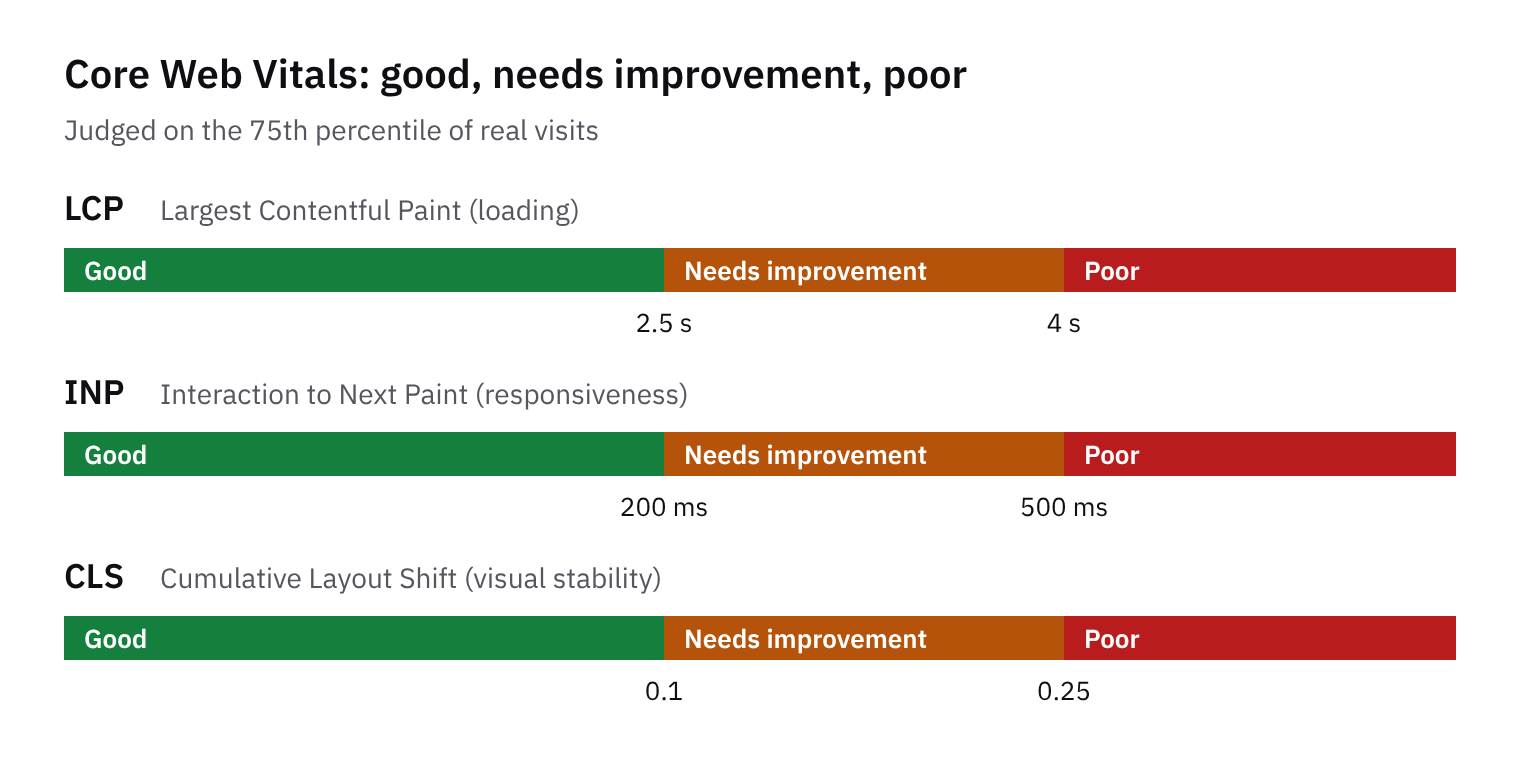
If most of your shoppers are on phones, mobile speed is the main experience, not a side concern. We looked at how much of each sector's Chrome traffic is on phones and how many stores pass all Core Web Vitals (Google's measures of loading, responsiveness and layout stability). Here's what that suggests for design and performance work.
Phones are the majority everywhere
Phones are the majority in every sector we looked at. Even the lowest medians, fashion and home at 60%, sit clearly above half of Chrome visits. At the other end, handbags reach 74%, with beauty at 68%. So the gap between sectors is real, but nobody gets to treat mobile as the side channel.
Share of visits on phones, by sector
Show the data
| Fashion | 60% |
|---|---|
| Beauty | 68% |
| Home | 60% |
| Food and drink | 62% |
| Tech accessories | 65% |
| Pets | 65% |
| Big retailers | 70% |
| Handbags | 74% |
For a merchant, this means the phone is where most first impressions happen. A product page that looks tidy on a wide monitor but buries the price or the add to cart button below a long gallery on a small screen is costing you, whatever your sector. For a developer, it changes the order of work. Design the phone layout first, then check desktop second. Starting small forces you to decide what really matters on the page, and desktop can then add room rather than rescue a cramped layout.
Treat these medians as a rough guide to the range, not a target. Your own store could sit well above or below its sector. Open your analytics, look at the device split, and see where you land. If you are near the top of the range, mobile polish deserves even more of your time.
Passing Core Web Vitals is far from universal
Pass rates vary a lot by sector. Food and drink does best, with 73% of stores passing all Core Web Vitals. Big retailers sit at the other end at 36%. Most other sectors land in the middle, and fashion, at 53%, is a fair example. Being large doesn't make a store fast. Big sites tend to carry more scripts, more tooling and more teams adding things, and that can quietly cost speed.
Stores passing all Core Web Vitals, by sector
Show the data
| Fashion | 53% |
|---|---|
| Beauty | 55% |
| Home | 56% |
| Food and drink | 73% |
| Tech accessories | 63% |
| Pets | 55% |
| Big retailers | 36% |
| Handbags | 59% |
Phone share doesn't line up neatly with passing either. Handbags are the most phone-heavy sector, with 74% of Chrome visits on phones, yet they pass at 59%, which is mid-table. So a mostly mobile audience doesn't mean the store has been built well for mobile. It just means the phone experience is the one that counts most.
Here's the tip. Check your own store's field data in Search Console or PageSpeed Insights, rather than relying on lab scores alone. Lab tests run one page on one simulated device. Field data is real visits, measured at the slowest end of what most visitors see, so it's much closer to what your customers feel. If the two disagree, trust the field data and use the lab tool to work out why.
Where the speed usually goes
Beauty is a good example of a mid-table sector. Its stores see a median of 68% of Chrome visits on phones, yet only 55% pass all Core Web Vitals. That's not a verdict on any cause. But when most visitors are on phones, the usual suspects are worth checking first: third-party scripts from apps, heavy images and general page weight.
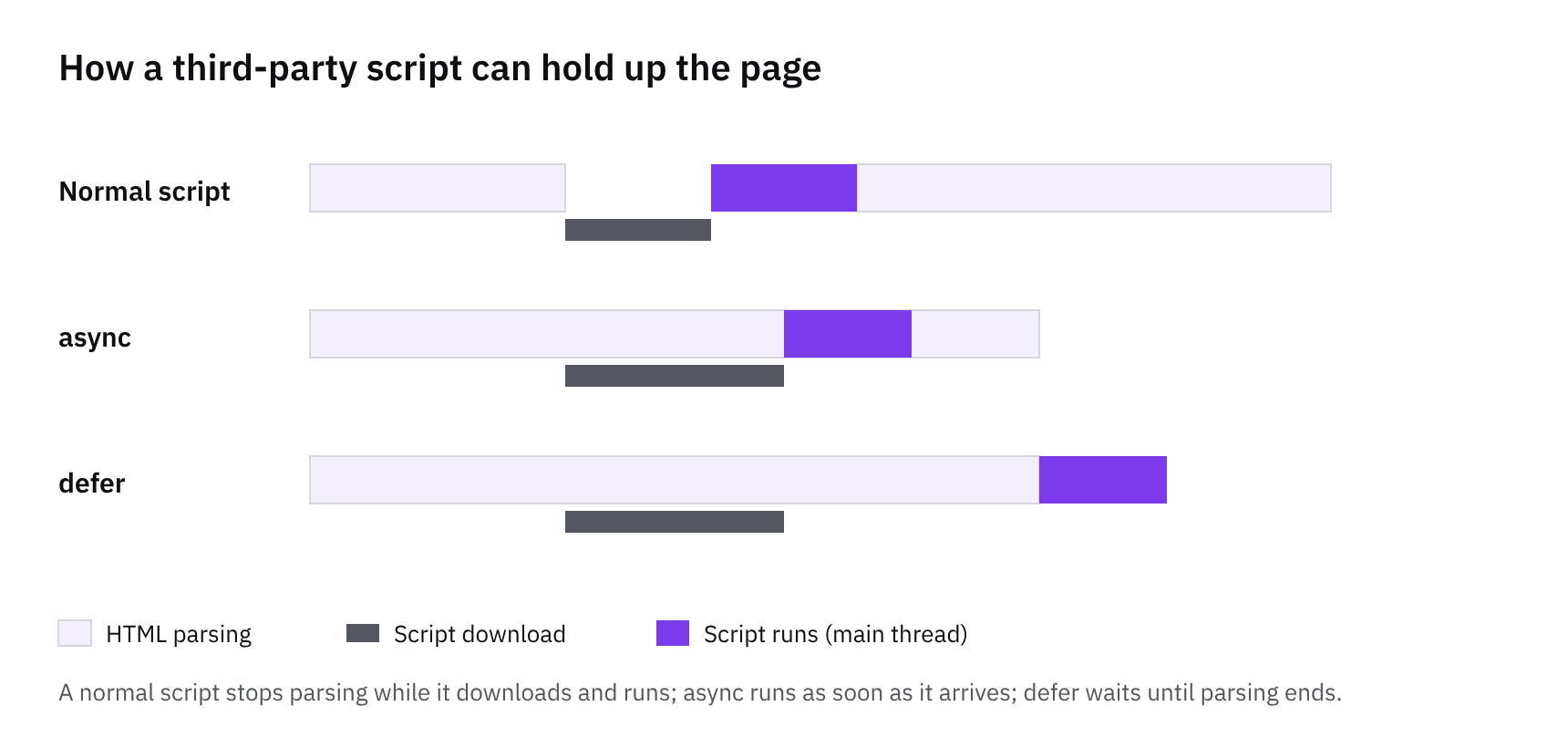
If you build themes, start with an audit of what loads on each template. App blocks and app embeds both add JavaScript, and an embed often loads on every page whether or not it's visible there. Open the network panel on the home, collection and product templates in turn, and ask what each script is doing on that page. Where an app only matters on the product page, load it there only. Compress and size images properly too, and lazy-load what sits below the fold.
If you run the store, treat every app as a speed cost to weigh against what it earns. A reviews widget that lifts trust may well be worth it. A pop-up you forgot about probably isn't. This tends to help because phones have less processing power and often slower connections, so the same script costs a phone more than a laptop. Even the big retailers, with only 36% passing, show that budget and scale don't guarantee a clean pass. We don't claim these are the causes in any sector, so measure your own store before you cut anything.
What to do next
Start with your own phone share. Open your analytics, split visits by device, and compare it with the sector picture in the charts. Then check your Core Web Vitals field data (real visits, not a lab test) in the Chrome UX Report or Search Console. Lab tools are handy for debugging, but the field numbers are what shoppers actually feel.
Fix the worst template first. That's usually the product page or a collection page, rather than the whole theme. This tends to help because one heavy template can drag down the lot, and fixing it gives you a clear before and after. Next, audit your apps. Remove what you don't use, and defer scripts that don't need to run before the page is usable. Leftover code from uninstalled apps is a common culprit, so check your theme files too.
When you do need an app, prefer theme app extensions. App blocks load only on the pages where you place them, while app embeds run site-wide, so you can keep widgets off templates that don't need them. A word on the sector charts: pets has just 11 stores and big retail also has 11, set against 129 in fashion. Treat the small-sector figures as a rough guide, and lean on your own field data over any sector average.
How we measured this
Of 411 stores we index that Chrome reports figures for, not the whole market.
Core Web Vitals and device mix come from the Chrome UX Report: real Chrome visits over the previous month, at the 75th percentile. Stores with too little Chrome traffic aren’t in it.
Sectors are our own labels from the curated store list.
Get the weekly digest
One email every Monday: the week’s new guides and articles, plus the Shopify deadlines coming up and what’s been announced. Free, and you can unsubscribe in one click.
Sources
- Chrome UX Report (CrUX) on BigQuery · Google · accessed 15 Oct 2026
- Web Vitals · Google · accessed 15 Oct 2026
- How CommerceGeek measures · CommerceGeek · accessed 15 Oct 2026
AI-assisted, reviewed by Scott. Every claim is checked against the sources above.