

Reviews apps for Shopify compared
Reviews apps differ in how they plug into Shopify and what they add to the page. Here is what we found in our sample, and what to weigh before you pick one.

- Published
- 15 Oct 2026
- As of
- 17 Oct 2026
This is for Shopify developers and the merchants they build for. We cover what reviews and UGC apps do, how they connect to a theme or a headless storefront, what they can cost you in page speed, and how widely each shows up in the stores we index.
As of 2026-10-15. Features and integrations are as each vendor’s own docs describe them; check the vendor’s site for current pricing. This is a factual comparison, not a ranking.
What reviews and UGC apps do, and who uses what
Just over half of the stores we scanned, 52%, load a reviews or UGC tool we can detect. So most stores in the sample have settled on one, and a large minority still have not, or run something we cannot see. UGC means user-generated content: reviews, ratings, photos and questions from customers. The job is to put social proof next to the buy button, and to feed star ratings into search listings and ads.
Reviews and UGC: who uses what
Show the data
| Yotpo | 22% |
|---|---|
| Okendo | 16% |
| Bazaarvoice | 5% |
| Judge.me | 4% |
| Trustpilot | 3% |
| Shopify Product Reviews | 3% |
| PowerReviews | 2% |
| REVIEWS.io | 1% |
Two tools dominate. Yotpo sits on 22% of the stores we scanned (72, with 71 on Shopify), and Okendo on 16% (52, all on Shopify). Together they cover a big share of the stores that use anything at all. Judge.me, Bazaarvoice and Shopify Product Reviews follow, each with a small slice. Judge.me has 12 stores, and Shopify Product Reviews has 11, all on Shopify.
Bazaarvoice is the odd one out. Its own docs describe a wide API surface: a Conversations API to retrieve and submit UGC, a Mobile SDK for Android and iOS, and a Transactions API to automate review collection. That reads like a platform for larger catalogues and custom builds, not a quick widget install. It is why it shows up beyond Shopify in our sample, with 16 stores in total and 10 on Shopify.
Most of the others are built around Shopify's theme app extensions, which let merchants add things like product reviews through the theme editor without touching Liquid. That is easier to maintain, and it is the route to ask about first on a Liquid theme.
Tip: before you shortlist, open your competitors' product pages and check which review tool each one loads. Your browser's network panel will show the script domains. It tells you what is common in your niche, and it shows you what that widget costs the page in extra requests.
How these apps plug into Shopify
Most reviews apps on Shopify now plug in through theme app extensions. That is Shopify's framework for adding dynamic elements, and its own docs list product reviews and ratings as examples. The extension holds blocks (Liquid files that act as the entry point), plus assets and snippets. Assets are the CSS, JavaScript and other static files injected into the theme. Shopify's docs say you can deploy to all the stores using your app at once, with versioning and asset hosting on the Shopify CDN.
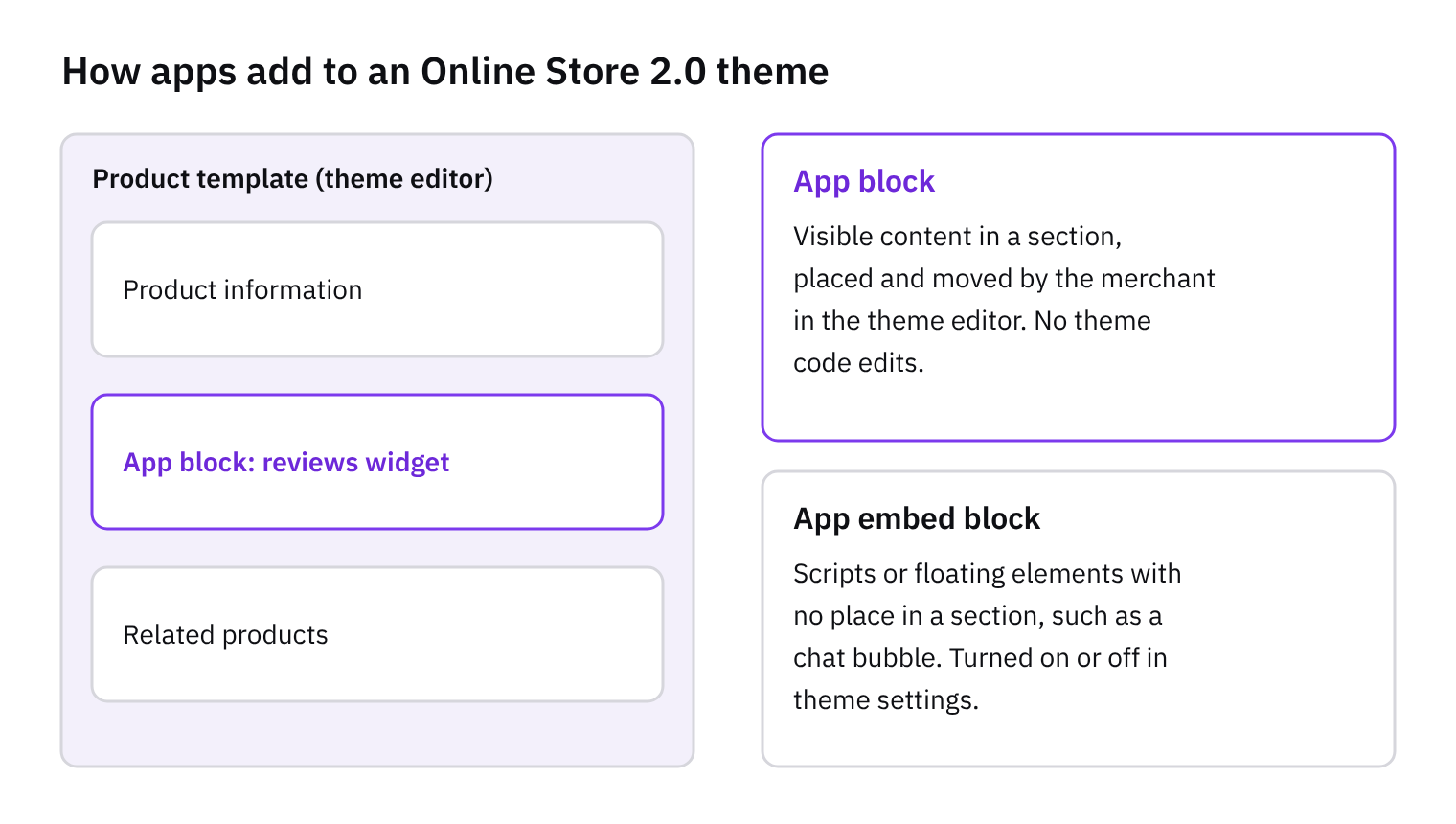
There are two block types: app blocks and app embed blocks. An app block sits inside a theme section, so a merchant can drop a star rating or a review list exactly where they want it. Per Shopify's docs, merchants use the theme editor to configure exposed settings and add app blocks for precise positioning. That works with Online Store 2.0 themes. So if you want reviews under the price rather than at the bottom of the page, you drag a block. You don't touch Liquid.
The other benefit is safety. Shopify says apps built this way don't edit theme code, which lowers the risk of breaking the theme. That makes installs and removals cleaner. Our developer tip: ask each vendor whether its widget is an app block you can place in a section, or only an embed. An embed-only widget gives you less control over layout, and you may end up writing custom Liquid to get the placement you want. Headless builds are a different route, and we'll cover them separately.
Bazaarvoice: an API-first option
Bazaarvoice is the API-first option in this comparison. Its docs describe a Conversations API for retrieving and submitting user-generated content (UGC), plus your product catalog and stats about that content. There is also a Mobile SDK for Android and iOS, a Response API for creating, reading, updating and deleting replies to reviews, and a Privacy API for fitting into compliance workflows. A Transactions API lets clients share transaction data to automate collection of UGC.
Two more pieces matter for storefront work. The Displayable Content Export requests Conversations data in bulk for public display over HTTP. The Authentic Discovery API is there to enable AI search bots and LLMs to discover a brand's UGC. One caveat: we only read Bazaarvoice's generic Getting Started docs here, not a Shopify-specific guide. We can't tell you how its theme install works.
The Shopify count is lower than the total: 10 of the 16 indexed stores using it. The rest run on other platforms, which fits a tool built around APIs rather than a Shopify-first widget. Our tip: on a headless build, API access means you can render reviews in your own components. That tends to help because you control markup, styling and loading, instead of inheriting a third-party widget's. Check the vendor's site for pricing and plans.
What they load on the page
Reviews widgets are third-party JavaScript. Whatever the app, it ships code that runs in your shopper's browser, next to your theme's own scripts. That code has to be parsed and executed, and it competes for the same thread as everything else on the page.
The web.dev guide on optimising long tasks explains why this matters. Any task longer than 50 milliseconds counts as a long task, and the main thread can only process one task at a time. While a long task runs, a tap on a variant picker or an add to cart button has to wait. Those delays are measured as poor Interaction to Next Paint (INP). We haven't measured any one reviews app against this. But it tends to follow that a heavy widget sitting below the fold can still hurt interaction, because it may run its scripts long before anyone scrolls to it.
So here's the tip. Load the widget late, either when it nears the viewport or on scroll, so it doesn't compete with the first interactions. Then look at your own scripts. Break long work into chunks and yield between them with scheduler.yield(). The web.dev guide notes that its continuation is prioritised, so code from other task sources, such as third-party scripts, can't interrupt it. It isn't supported in every browser, though, so write a fallback. The same guide warns that a setTimeout fallback puts your work at the back of the queue, so other waiting tasks run first. That's fine as a safety net, but test it.
How to choose
Start with how the app gets onto the page. Shopify's docs on theme app extensions say they let merchants add dynamic elements, product reviews included, without touching Liquid templates or code. They also expose the app in the theme editor, so you can place a review block exactly where you want it. Ask each vendor whether it ships app blocks and app embed blocks for Online Store 2.0 themes. Those apps don't edit theme code, which the docs say lowers the risk of breaking the theme. If a tool still wants you to paste snippets into templates, expect more upkeep at every theme update.
Next, check how you would get at the data if you go headless. Bazaarvoice's own docs, for example, describe a Conversations API, a Mobile SDK and a Displayable Content Export, which is the sort of access a Hydrogen build needs. Ask every vendor for the equivalent. Also ask about structured data for star ratings: does the app output it, can you control it, and does it match what shoppers see? Then check import and export, so you can leave later without losing years of reviews. Finally, weigh moderation tools and how easily customers can add photos and video. Pricing is on each vendor's site, so compare plans there.
Then look at what the script costs in speed. The web.dev guidance on long tasks explains that any main-thread task over 50 milliseconds is a long task, and that these show up as poor Interaction to Next Paint. A heavy review widget can add to that, because the main thread handles one task at a time. This tends to hurt most on product pages, where shoppers tap variants and add to cart. Shopify's own Product Reviews tool appears in 11 indexed stores, all on Shopify, so it's worth a look if your needs are simple. Our tip: install each shortlisted app on a development theme and test the product page before committing. Check the theme editor placement, the rating markup and how responsive the page feels.
How we measured this
Of 321 stores we index that we could scan, not the whole market.
Features and tools are read from each store’s public HTML, so anything added only by JavaScript after the page loads may be missed: treat these as lower bounds.
Tools are recognised by our detection rules; a tool we have no rule for isn’t counted.
Spotted something out of date? Tell us and we’ll correct it.
Get the weekly digest
One email every Monday: the week’s new guides and articles, plus the Shopify deadlines coming up and what’s been announced. Free, and you can unsubscribe in one click.
Sources
- Getting Started · developers.bazaarvoice.com · accessed 15 Oct 2026
- About theme app extensions · shopify.dev · accessed 15 Oct 2026
- Optimize long tasks | web.dev · web.dev · accessed 15 Oct 2026
- How CommerceGeek collects store data · CommerceGeek · accessed 15 Oct 2026
AI-assisted, reviewed by Scott. Every claim is checked against the sources above.