

Shopify Scripts are deprecated: moving to Shopify Functions
Shopify Scripts stop running on 30 June 2026, so here is what that means and how to move line item, shipping and payment logic to Shopify Functions.

- Published
- 6 Nov 2026
- As of
- 5 Nov 2026
If your store or a client's store still relies on Shopify Scripts, the clock is running. This guide explains the dates, what replaces each kind of Script, and a simple migration path. It is written for developers and the merchants who rely on them.
What the deprecation means now
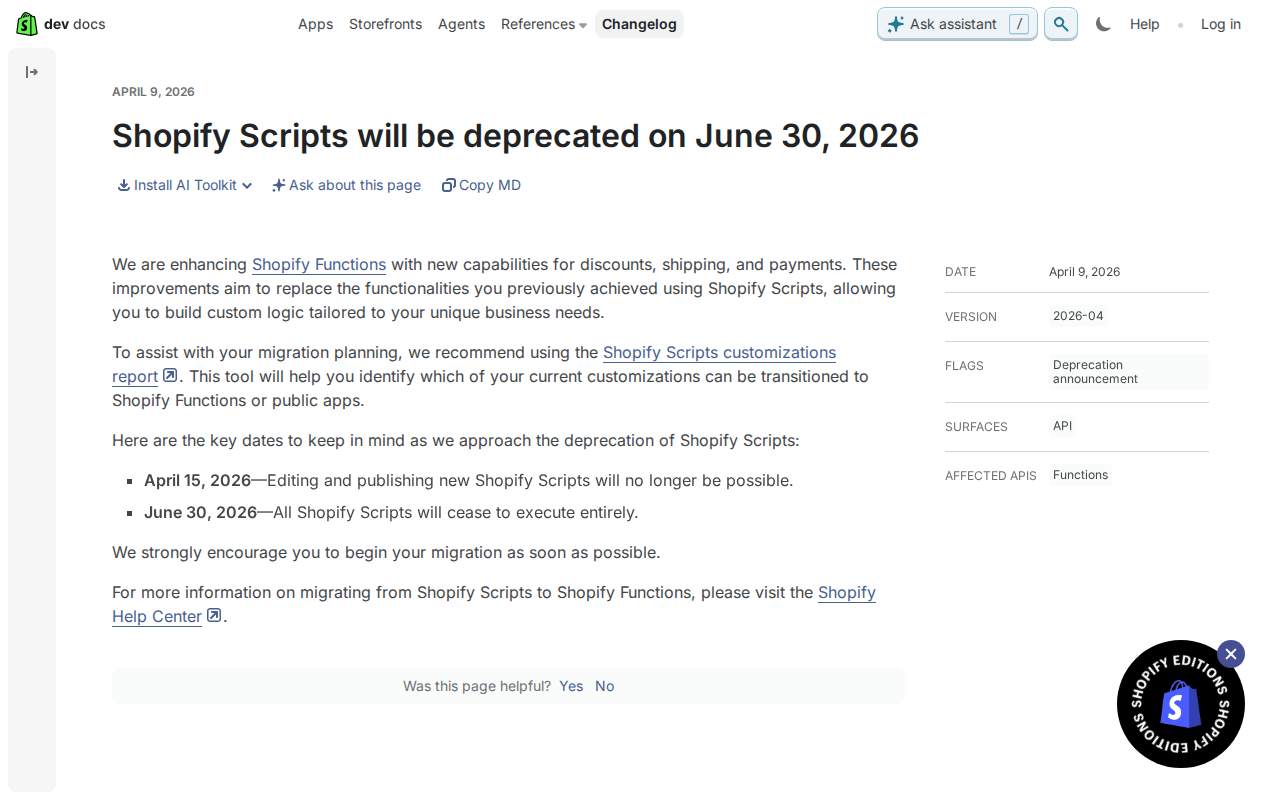
Shopify announced the deprecation in a developer changelog post dated 9 April 2026. From 15 April 2026, you can no longer edit Scripts or publish new ones. On 30 June 2026, all Scripts stop executing entirely. You can read the changelog post and follow the change on our [deprecation tracker](https://shopify.dev/changelog/shopify-scripts-will-be-deprecated-on-june-30-2026).
In practice, a live store keeps running its existing Scripts until the June date, but you can't fix or tweak them. If a discount rule has a bug, or a shipping rule needs a new region, you can't change the Script. You have to rebuild the logic somewhere else. On 30 June, whatever the Scripts were doing at checkout simply stops. Shopify's changelog says it is adding new Shopify Functions capabilities for discounts, shipping and payments to replace what Scripts used to do.
Treat 30 June as a hard stop and plan backwards from it. Leave time for building, testing and a calm switch-over, rather than doing it all in the last week. Shopify also points to its Scripts customizations report, which helps you spot which customizations can move to Functions or to public apps. Start there, because it tells you how big the job really is.
How Shopify Functions work
Shopify Functions replace Scripts, but they work differently. A Script ran Ruby inside Shopify's checkout. A function is logic compiled to a WebAssembly module, and the About Shopify Functions docs say it can be written in any language that compiles to one that meets the function requirements. Shopify provides templates and client libraries for Rust and JavaScript. For large carts, Shopify strongly recommends Rust as the most performant choice, because it helps you avoid a function failing. If your Scripts loop over many line items, that advice is worth taking seriously.
The flow is simple. You define a GraphQL input query, and Shopify runs it and hands your function the result as a JSON object. Your function returns a JSON document describing operations for Shopify to carry out. Merchants install the app and configure the function. Shopify then invokes it as needed during the customer journey. Functions are never called by URL, so there is no endpoint to host, secure or keep warm. Shopify also publishes GraphQL schemas for each Functions API, which set out the targets, the available inputs and the expected outputs.
Plans matter here. Stores on any plan can use public apps from the Shopify App Store that contain functions. Only Shopify Plus stores can use custom apps that contain Function APIs, and some capabilities are Plus-only too. So a merchant on Plus can build their own, while others will lean on public apps.
One practical tip: request only the fields your function needs in the input query. Your function receives only what you ask for, so a lean query keeps the input small. That tends to help because less data to read means less work on each run, which matters most on big carts. Start with the minimum, then add a field only when the logic needs it.
Replacing shipping and payment Scripts
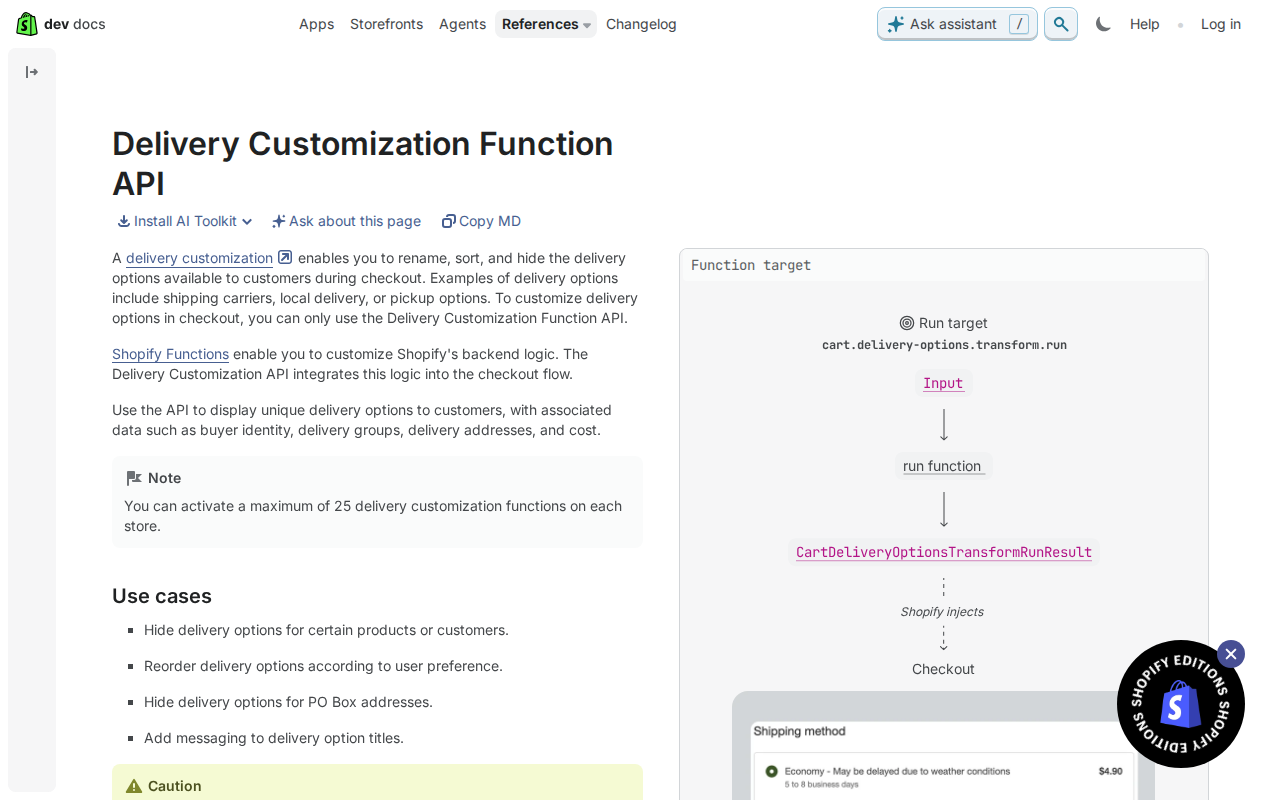
Shipping Scripts map to the Delivery Customization Function API. It lets you rename, sort and hide the delivery options shown at checkout, and Shopify's docs say it is the only way to customise delivery options there. Your logic goes in the cart.delivery-options.transform.run target. Scaffold it with the Shopify CLI: shopify app generate extension --template delivery_customization. A store can have a maximum of 25 active delivery customization functions, so combine rules where you can rather than writing one function per old Script. Two limits to know: hiding options for PO Box addresses only works for options from carrier services or third-party shipping apps, and the API isn't supported on the Cart page, Storefront or Subscription (Recurring Orders) surfaces.
Payment Scripts map to the Payment Customization Function API. It can rename, reorder and hide payment methods, set payment terms, and add a review requirement to an order (the review requirement is for B2B orders only). The target is cart.payment-methods.transform.run, and it returns an ordered list of operations. Scaffold it with shopify app generate extension --template payment_customization. The same cap of 25 active functions per store applies. Check the limits against your old Script before you promise parity: payment terms can't be set when the cart has items with subscription selling plans, and they aren't supported in storefront accelerated checkouts. Also request only the fields your input query needs, as the docs recommend. Less data in means a leaner function.
Test with orders that mix delivery methods. The Delivery Customization docs note that a checkout can combine shipping and pickup, so iterate over all delivery groups instead of assuming one method per order. Old Scripts often made that assumption without saying so. Also test Apple Pay and Google Pay: the function runs first with a partial address, before the buyer authorises payment, then again with the full address. A rule that depends on postcode or street should cope with the first run having less data. This tends to catch the awkward cases before you switch the old Script off.
Replacing line item Scripts
Line item Scripts usually mean discounts or cart changes: a percentage off for a customer group, a free gift, a bundle price. Shopify says it is enhancing Shopify Functions with new capabilities for discounts, shipping and payments, aiming to replace what you previously did with Scripts, according to the developer changelog. So the target is clear, even if the exact API for each rule needs checking.
Start with public apps. The Shopify Functions docs say stores on any plan can use public apps from the Shopify App Store that contain functions. Custom apps with Function APIs are only for Shopify Plus stores, and some capabilities are Plus-only too. For a simple discount, an existing app may save you a build and ongoing maintenance. If you need custom logic, look at the Functions docs and the GraphQL schemas Shopify provides, which set out the targets, inputs and outputs for each API.
Tip: before you look for an API or an app, write each discount rule in plain words. For example, say who qualifies, which items count, what changes, and when it stops applying. This tends to help because Scripts often hold rules nobody has read for years, and a clear sentence is much easier to match to an app setting or a Function. If you build it yourself, the Functions docs say Rust is the most performant choice, which matters for large carts. Request only the fields your input query needs.
A practical migration path
Start with an inventory. Shopify recommends its Shopify Scripts customizations report, which helps you see which of your current customizations can move to Shopify Functions or to public apps. Run it first and write down what each Script does, who relies on it and when it last changed. Then map each one. Delivery logic that renames, sorts or hides shipping options belongs in the Delivery Customization Function API. Logic that renames, reorders or hides payment methods belongs in the Payment Customization Function API. If a public app from the Shopify App Store already does the job, installing it is often less work than building. Stores on any plan can use public apps that contain functions, but custom apps with Function APIs need Shopify Plus, so check your plan before you commit to a build.
Next, build or install somewhere safe. If you are building, the Shopify CLI can scaffold a delivery_customization or payment_customization extension. The docs strongly recommend Rust for performance, because it helps avoid failures with large carts. Request only the fields your input query needs, as Shopify advises, since it keeps the function lean. Then test the awkward cases. Checkouts can include several delivery methods, such as shipping and pickup in one order, so loop over every delivery group instead of assuming one. In Apple Pay and Google Pay, the delivery function runs first with a partial address and again with the full one. Payment terms can't be set when the cart has subscription selling plans. Try a big cart too.
Switch over one Script at a time. That way, if a rule behaves differently, you know exactly which change caused it, and you can fix it without unpicking several at once. Once a replacement is live and checked, remove the old Script. If you built a function you later retire, delete it by removing its files from the app's /extensions directory and redeploying; after that it is permanently gone. Shopify has said Scripts can't be edited or published from 15 April 2026 and stop executing on 30 June 2026, so leave yourself time for testing rather than leaving the switch to the last week.
Get the weekly digest
One email every Monday: the week’s new guides and articles, plus the Shopify deadlines coming up and what’s been announced. Free, and you can unsubscribe in one click.
Sources
- Shopify Scripts will be deprecated on June 30, 2026 - Shopify developer changelog · shopify.dev · accessed 3 Nov 2026
- About Shopify Functions · shopify.dev · accessed 3 Nov 2026
- https://shopify.dev/docs/api/functions/latest/delivery-customization · shopify.dev · accessed 3 Nov 2026
- https://shopify.dev/docs/api/functions/latest/payment-customization · shopify.dev · accessed 3 Nov 2026
AI-assisted, reviewed by Scott. Every claim is checked against the sources above.